The Virtual DOM
The Virtual DOM in React: From Zero to Hero
If you've been learning React, you've almost certainly heard the phrase Virtual DOM. It's one of those concepts that everyone mentions, but few people actually explain in a way that makes sense.
You'll often hear things like:
"React uses a Virtual DOM to make updates faster."
While that's technically true, it doesn't really answer any questions.
- What is the Virtual DOM?
- Why was it invented?
- Does it replace the browser's DOM?
- Is it actually faster?
- What happens when state changes?
- What is React comparing exactly?
By the end of this article, you'll understand the entire rendering process inside React, from the moment your data changes until the browser updates the screen.
First, let's understand the Real DOM
Before talking about the Virtual DOM, we need to understand the thing it's trying to improve.
Every webpage is represented by the browser as a huge tree called the DOM (Document Object Model).
Imagine this HTML:
<body>
  <div>
    <h1>Hello</h1>
    <button>Click me</button>
  </div>
</body>
The browser turns it into something like this:
body
└── div
    ├── h1
    │   └── "Hello"
    └── button
        └── "Click me"
This tree is a living data structure inside the browser.
Every HTML element becomes a node.
JavaScript can manipulate these nodes whenever it wants.
For example:
document.querySelector("h1").textContent = "Welcome";The browser changes the text and updates what you see.
Simple enough.
So what's the problem?
Changing the DOM isn't inherently slow.
The expensive part is everything that happens after changing it.
Whenever the browser notices that something changed, it may need to:
- recalculate styles
- recalculate layouts
- determine positions
- repaint pixels
- sometimes recompose layers
Imagine a page with:
- 5,000 products
- filters
- animations
- images
- buttons
- menus
If you're modifying the DOM dozens of times every second, the browser has a lot of work to do.
Years ago, developers often updated the DOM manually.
Imagine adding one item to a shopping cart.
You might write:
cartCounter.textContent = count;
priceElement.textContent = total;
cartList.appendChild(newItem);
As applications grew larger, manually keeping everything synchronized became painful.
People forgot updates.
Some updates happened twice.
Others never happened.
Bugs appeared everywhere.
React wanted to solve this.
React introduced a different idea
Instead of asking developers to manually update the page, React asks something much simpler:
"Just tell me what the UI should look like."
Not how to update it.
Just what it should be.
For example:
return (
  <h1>Hello {user.name}</h1>
);
You don't tell React:
- replace this text
- update this attribute
- remove this node
- insert another node
You simply describe the desired UI.
React figures out the rest.
But to do that, React needs something to compare.
That's where the Virtual DOM comes in.
The Virtual DOM
The Virtual DOM is simply a JavaScript representation of your UI.
Not HTML.
Not browser objects.
Just plain JavaScript objects.
For example, this:
<div>
  <h1>Hello</h1>
  <button>Save</button>
</div>
Internally becomes something conceptually similar to:
{
  type: "div",
  props: {},
  children: [
    {
      type: "h1",
      children: ["Hello"]
    },
    {
      type: "button",
      children: ["Save"]
    }
  ]
}
That's it.
It's just data.
No browser.
No pixels.
No rendering.
Just objects in memory.
Why is this useful?
JavaScript objects are incredibly cheap to create and compare.
Changing objects in memory is much cheaper than touching the real browser DOM.
So React follows this strategy:
- Build a Virtual DOM.
- Compare it with the previous one.
- Figure out what changed.
- Update only those parts of the real DOM.
Let's see it in action
Imagine this component:
function Counter() {
  const [count, setCount] = useState(0);

  return <h1>{count}</h1>;
}
Initially:
Virtual DOM

h1
└── 0
The browser displays:
0Now the user clicks:
setCount(1);React creates a brand-new Virtual DOM.
Old

h1
└── 0
New
h1
└── 1Now React compares both trees.
It notices:
- same
<h1> - only the text changed
Instead of rebuilding everything, React simply updates the text node.
The browser changes:
0to
1Nothing else changes.
Wait... React creates a whole new tree every time?
Yes.
This surprises many developers.
Every render creates a new Virtual DOM tree.
At first this sounds wasteful.
Wouldn't it be faster to modify the old one?
Actually, modern JavaScript engines are incredibly good at allocating short-lived objects.
Creating new objects is usually very cheap.
The expensive work is touching the browser.
React prefers to spend a little CPU in JavaScript if it means doing much less work in the DOM.
The comparison process
React now has:
Old tree
div
├── h1
└── button
New tree
div
├── h1
└── button
It walks both trees simultaneously.
Node by node.
Like this:
div == div ✔

h1 == h1 ✔

button == button ✔
If only one text changes:
Hello↓
WelcomeReact updates only that text.
This comparison is called Reconciliation
One of the most important words in React.
Reconciliation is the process of comparing:
- Old Virtual DOM
- New Virtual DOM
Its goal is simple:
Find the smallest possible set of changes.
The algorithm responsible for this comparison is commonly called the diffing algorithm.
Why doesn't React compare everything perfectly?
Imagine comparing two trees with 50,000 nodes.
Finding the absolute minimum number of changes between arbitrary trees is a very difficult computer science problem.
Its complexity can become enormous.
React doesn't try to solve the perfect version.
Instead, it uses smart assumptions.
These assumptions make the algorithm extremely fast in real-world applications.
React's assumptions
React assumes:
Elements with different types are different
<div />↓
<section />React immediately replaces the entire subtree.
No detailed comparison.
If the types are the same:
<div>↓
<div>React compares their children.
Keys become extremely important
Consider this list:
[
  "Apple",
  "Banana",
  "Orange"
]
Now insert:
"Mango"at the beginning.
Without keys, React sees:
Apple → Mango

Banana → Apple

Orange → Banana

new Orange
It looks like every element changed.
With keys:
<li key={fruit.id}>React immediately understands:
- Apple stayed
- Banana stayed
- Orange stayed
- Mango is new
Much less work.
This is why React documentation emphasizes using stable keys instead of array indexes whenever possible.
Does the Virtual DOM make React faster?
This is probably the biggest misconception.
Many articles say:
"Virtual DOM is faster than the real DOM."
That's not exactly true.
The browser DOM is highly optimized.
In many cases, manually updating exactly one element yourself can be faster than React.
React's advantage is different.
It automates finding the minimal set of updates while keeping your code declarative and predictable.
The Virtual DOM isn't magic.
It's an efficient strategy for managing UI updates at scale.
The render phase
Whenever state changes:
setUser(...)React starts rendering.
During this phase it:
- calls your components
- executes their functions
- creates new React elements
- builds a new Virtual DOM
Nothing visible happens yet.
This phase only exists in memory.
The commit phase
Once React knows exactly what changed, it enters the commit phase.
Now—and only now—it touches the browser.
It performs operations like:
- creating elements
- removing elements
- updating text
- changing attributes
- attaching event listeners
This phase is where the real DOM changes.
React doesn't repaint the screen
This is another common misunderstanding.
React updates the DOM.
The browser decides when to:
- recalculate layouts
- repaint pixels
- composite layers
Rendering the page visually is still the browser's job.
React simply prepares efficient DOM updates.
Modern React is even more sophisticated
In older versions of React, rendering was synchronous.
Today, with the Fiber architecture introduced in React 16 and expanded through features like Concurrent Rendering, React can:
- pause rendering
- resume rendering later
- prioritize urgent updates
- delay less important work
- interrupt rendering if something more important happens
Interestingly, the idea of the Virtual DOM still exists, but Fiber changed the internal data structures used to represent and process that work. Instead of treating rendering as one uninterrupted task, React breaks it into smaller units that can be scheduled more intelligently.
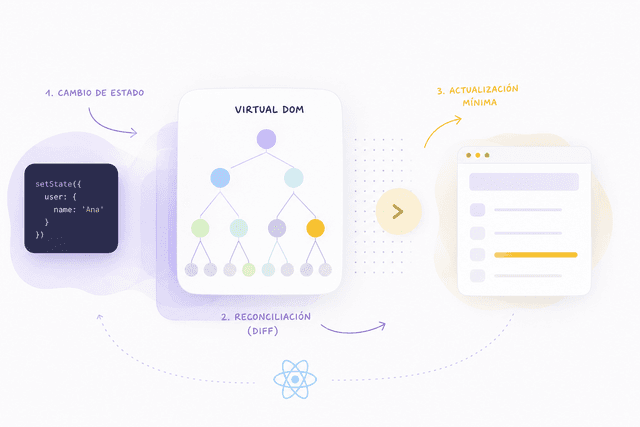
A complete example
Let's follow the entire lifecycle.
You click:
setCount(5);↓
React schedules an update.
↓
Your component function runs again.
↓
A brand-new Virtual DOM tree is created.
↓
React compares it with the previous tree.
↓
It identifies exactly what changed.
↓
It enters the commit phase.
↓
The browser DOM is updated.
↓
The browser repaints the screen if necessary.
All of this usually happens in just a few milliseconds.
The biggest takeaway
The Virtual DOM is not a second browser.
It does not replace HTML.
It does not make the browser magically faster.
Instead, it's an in-memory description of your UI that allows React to answer one important question efficiently:
"Given what the UI looked like before, and what it should look like now, what's the smallest set of changes needed to make the browser match?"
That simple idea is one of the foundations of React's programming model. It lets developers focus on describing the UI instead of manually manipulating the DOM, while React handles the bookkeeping required to keep the page in sync. For small applications, the difference may be subtle. For large, interactive interfaces with thousands of components updating over time, that abstraction becomes incredibly valuable.
Understanding the Virtual DOM isn't just about knowing an internal implementation detail—it's about understanding the philosophy behind React itself:
Describe the desired state, let React figure out the most efficient path to get there.